There is no direct method to determine that if current user who is triggering a Nintex workflow on a list item is member of a SharePoint Group or not. In one of my recent projects I needed that functionality to differentiate set of actions based on user's group membership.A common example is that if user is member of an HR group for purpose of approval.
Achieving this is easy in a Nintex Form by using the built in method "fn-IsMemberOfGroup". This function takes one argument that is the "Group Name" and returns true or false indicating the membership status of current user for given SP group.
Getting the same functionality in Nintex Workflow is not straight forward. It requires couple of actions to achieve the same result. Here is the solution of how this can be achieved in a Nintex Workflow.

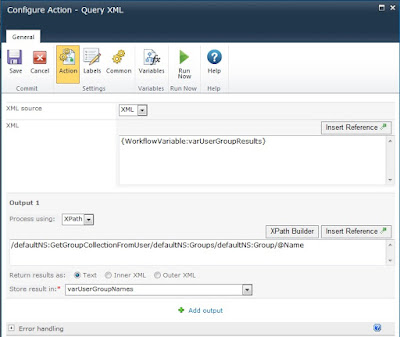
The resulting groups are stored in varUserGroupResults in XML format.
Now all the group names are in the collection and easy to iterate through.

The variable varUserMemberOfGroup is a boolean type which shows that whether current user is part of a specific SharePoint group or not.
Achieving this is easy in a Nintex Form by using the built in method "fn-IsMemberOfGroup". This function takes one argument that is the "Group Name" and returns true or false indicating the membership status of current user for given SP group.
Getting the same functionality in Nintex Workflow is not straight forward. It requires couple of actions to achieve the same result. Here is the solution of how this can be achieved in a Nintex Workflow.
1. In Nintex Workflow designer add couple of variables to the workflow
varUserGroupResults Multiple lines of text
currentUser Person or Group
varUserGroupNames Collection
varUserMemberOfGroup Yes/No
2. Next add "Call Web Service" action and in the action set the following details as shown in the screenshot. This service call calls the usergroup.asmx web service and calls GetGroupCollectionFromUser web method to get all groups to which the user has access to.
varUserGroupResults Multiple lines of text
currentUser Person or Group
varUserGroupNames Collection
varUserMemberOfGroup Yes/No
2. Next add "Call Web Service" action and in the action set the following details as shown in the screenshot. This service call calls the usergroup.asmx web service and calls GetGroupCollectionFromUser web method to get all groups to which the user has access to.

3. Now extract the group names as a collection using Query XML action. Add Query XML action to the workflow having following details

Now all the group names are in the collection and easy to iterate through.
4. Add "Collection Operation" action to the workflow to iterate through and compare the value with a group name you want to check against e.g. Approvers Group. If comparison returns true then user is part of that group else not.

The variable varUserMemberOfGroup is a boolean type which shows that whether current user is part of a specific SharePoint group or not.
There might be other ways of achieving the same result but just thought of sharing this as it took me a while to make this working.
Happy Work-flowing!!
Happy Work-flowing!!

